Buying a Used iPod: How to Identify the Model
Identifying a second-hand iPod: model and serial numbers, hard drive or flash, battery ratings, Apple service status, connectors and syncing today.
Finding the model number
Every iPod carries an Apple model number, printed in small type on the back near the bottom or, on some iPod shuffle and iPod nano models, under the clip. Except for the original scroll-wheel iPod, labelled M8541, the number is an A followed by four digits. Apple's "Identify your iPod model" page lists each model with its number, introduction date, capacities and distinguishing features. One number can cover several models: A1238 appears on all three iPod classic versions of 2007, 2008 and 2009, and A1051 on both iPod mini generations. Apple separates such models by capacity, colour, controls and, for some, the last three characters of the serial number. The serial number is engraved on the back of the iPod nano and iPod touch, printed on the clip of the fourth-generation iPod shuffle and sixth-generation iPod nano, and shown under Settings > General > About on the iPod touch and later nanos.
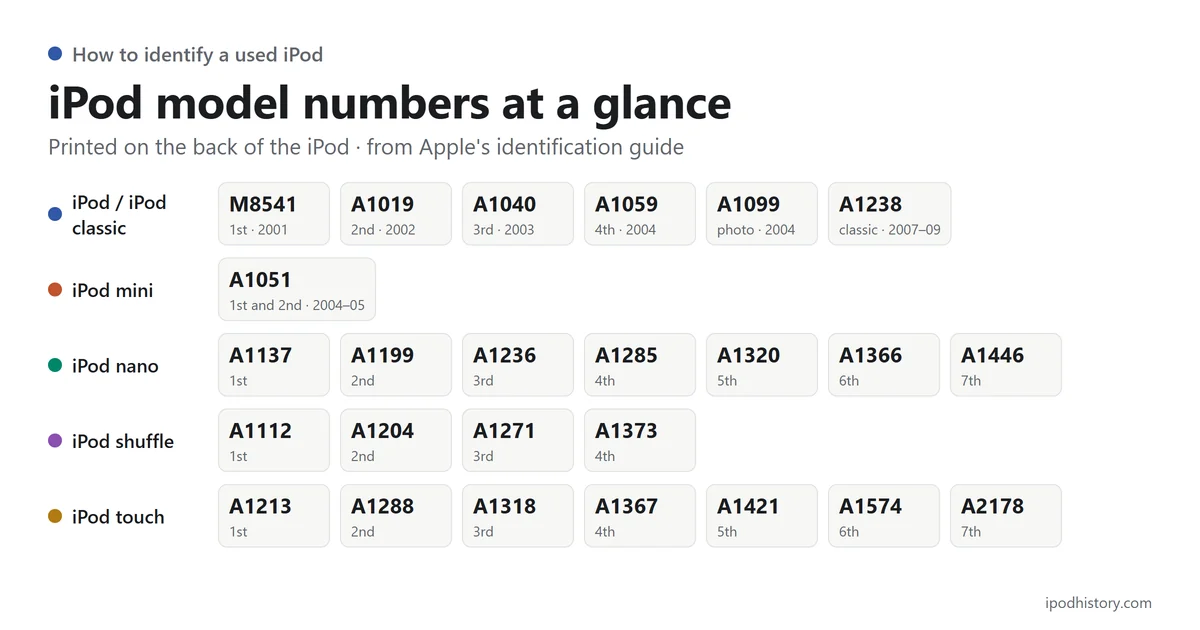
Hard drive or flash memory
Every full-size iPod, from the 2001 original to the iPod classic of 2009, stored music on a hard disk, and the iPod mini used a Microdrive, a miniature hard disk. The iPod nano, iPod shuffle and iPod touch used flash memory. The capacity is engraved on the back of the first-generation iPod nano and the second-generation iPod mini, and on the USB connector of the first iPod shuffle.
Battery and service
Apple designed iPod batteries to keep up to 80 per cent of their original capacity after 400 complete charge cycles, so Apple's published playback times, such as about 10 hours for the 2002 models, describe a new battery. Apple lists every iPod classic, iPod mini, iPod nano and iPod shuffle model as obsolete, and it discontinues all hardware service for obsolete products.
Connectors and computers
The 2001 and 2002 full-size models connect only through FireWire. From the third-generation iPod of 2003 until 2012, iPods other than the shuffle used Apple's 30-pin dock connector; the seventh-generation iPod nano and the iPod touch from its fifth generation use Lightning. The first iPod shuffle has a built-in USB plug, while later shuffles connect through the headphone socket using a dock or cable. Apple's current Mac Help says an iPod classic, nano or shuffle can receive content only by syncing with a Mac, and its iTunes guide for Windows 10 or later still covers these models.
Explore iPod models
Explore Classic, Mini, Nano, Shuffle, and Touch models.
Browse related iPod history
Browse the 2001, 2002, 2003, 2004, 2005, 2006, and 2007 reference pages for year-based history. You can also explore Accessories and Advertising for related iPod topics.